Version: v241204.1
Release Date: 4th December, 2024
Summary
This release includes two new record types - BRN and BRD and bugfixes.
Changelog
Upgrade steps from previous version (version v241115.1)
Please update, copied from previous notes
The following are deployment steps that are required to upgrade the solution from the previous version. These steps must be followed. Do not complete any manual steps until any outstanding manual steps from previous version(s) have been executed
Manual pre-deployment steps
Change ABC Backend API base url
- Open Deploy Client release pipeline and go to Edit pipeline page.
- Switch to Variables tab, edit configJSON variable for the target environment scope. 3 Update "baseUrl" property withing the variable. Make sure it contains only domain name, without "/api" path, for example "baseUrl": "https://afa-dev-r1-abc-01.azurewebsites.net"
Repeat steps 2-3 but for the "Release 13" in the scope of the release:
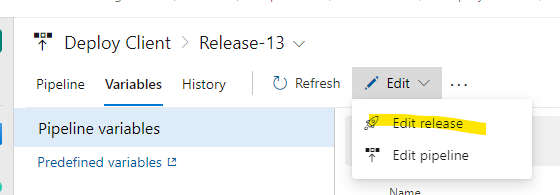
Remove configuration for record types
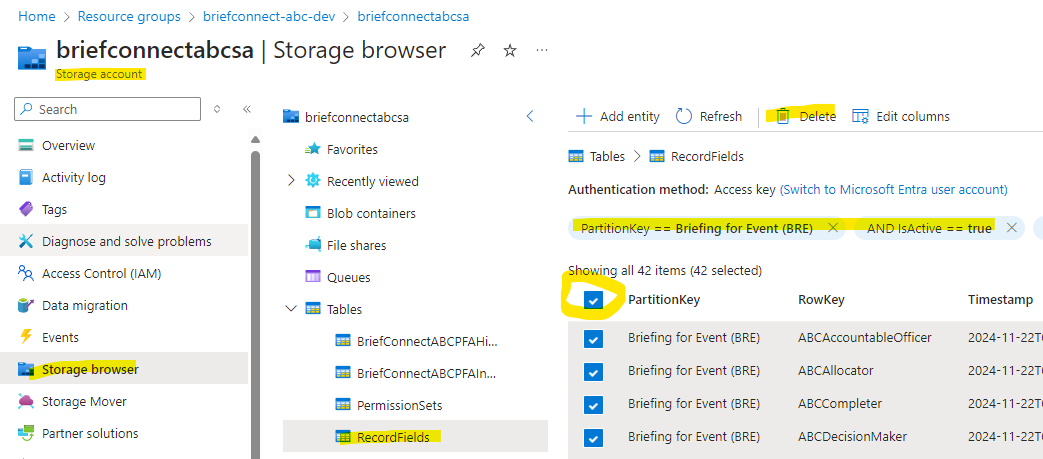
- Go to environment Azure resources, find Storage Account, open Storage Explorer in it
- Find "RecordFields" table and open it
- Add filters: PartitionKey == 'Briefing for Event (BRE)' AND isActive == true
- Select all filtered records and delete them.
- Set filters to: PartitionKey == 'Briefing for Meeting (BRM)' AND isActive == true
- Select all filtered records and delete them.
Remove content types
Go to environment SharePoint site collection, open Site Settings - Site content types. Find and delete 'Briefing for Meeting (BRM)' and 'Briefing for Event (BRE)' content types if they exist there.
Deployment steps
- Deploy Release-24 for Deploy Config Tables release pipeline in Azure DevOps to the target environment.
- Deploy Release-13 for Deploy Server release pipeline in Azure DevOps to the target environment.
- Deploy Release-13 for Deploy Client release pipeline in Azure DevOps to the target environment.
Manual post-deployment steps
Content types creation
- Start SharePoint content type creation: Make GET request to "https://[ABC Backend base url]/api/StartSharePointContentTypesUpdating?key=[key from app settings]" endpoint of API app. You will need to include Authorization header. Example:
bash
curl 'https://afa-dev-r1-abc-01.azurewebsites.net/api/StartSharePointContentTypesUpdating?key=SharePointContentTypesUpdatingKey' \
  -H 'accept: */*' \
  -H 'authorization: Bearer [berear token value]'
- To extract authorization header value from ABC app, open ABC application in browser and log into the application using ABC Admin account
- Open DevTools in browser (F12 button)
- Open 'Network' tab in DevTools, set '/api/' value in 'Filter' input
- Refresh the home page (F5 hotkey)
- In the list of requests, select any with 'fetch' value in 'type' column
- In 'Request Headers' section, find 'Authorization' header and copy it's value prefix
- Use this value for 'authorization' header in GET request to the endpoint.
- Wait for 20 minutes for the content types to be created.
- Check Log field in the RecordFields table for any errors. If there are any errors, please resolve them before proceeding. After resolving the errors, re-run the above API call.
- Check SharePoint content types and fields if they have been created successfully.
Change AADGroupName in the RoleAssignments table
- Go to Azure portal
- Open environment resource group, find Storage account, open Storage Browser - Tables
- Open 'Role Assignments' table
- Sort based on the AADGroupNames column
- In all rows where you see "AZ-AUTO-DEV-ABC-Users" replace it with related environment group.
Rollback steps to previous version
- Run Deploy Config Tables release pipeline for the previous version in Azure DevOps.
- Run Deploy Server release pipeline for the previous version in Azure DevOps.
- Run Deploy Client release pipeline for the previous version in Azure DevOps.
- Execute "Manual post deployment - Content types creation" step.