DE ABC v241204.1 Consolidated %2D Release Notes and Upgrade Guide
Version: v241204.2
Release Date: 16th December, 2024
Manual pre-deployment steps
Change ABC Backend API base url
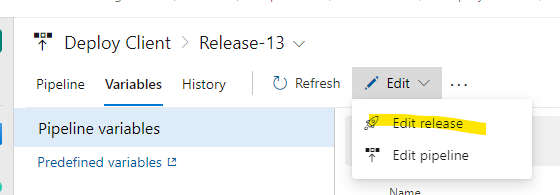
- Open Deploy Client release pipeline and go to Edit pipeline page.
- Switch to Variables tab, edit configJSON variable for the target environment scope. 3 Update "baseUrl" property withing the variable. Make sure it contains only domain name, without "/api" path, for example "baseUrl": "https://afa-dev-r1-abc-01.azurewebsites.net"
Repeat steps 2-3 but for the current "Deploy ABC Application" release in the scope of the release and on pipeline definition level too:
Remove content types
Go to environment SharePoint site collection, open Site Settings - Site content types. Find and delete 'Briefing for Meeting (BRM)' and 'Briefing for Event (BRE)' content types if they exist.
Deployment steps
- Deploy Release-15 for Deploy Office Resources release pipeline in Azure DevOps to the target environment.
- Deploy Release-3 for Deploy ABC Application release pipeline in Azure DevOps to the target environment.
Manual post-deployment steps
Link document templates
- Go to Document Templates library in SharePoint
- Associate templates to the right Record Types based on the file: DocTemplates.csv
- Create missing templates or copy from another environment
Change AADGroupName in the RoleAssignments table
- Go to Azure portal
- Open environment resource group, find Storage account, open Storage Browser - Tables
- Open 'Role Assignments' table
- Sort based on the AADGroupNames column
- In all rows where you see "AZ-AUTO-ABC-DEV-Users" replace it with related environment group.
Power BI model and demo dashboard deployment
The PowerBI dashboard (.PBIX) file is in the PowerBI folder. For now, make a copy of it and complete the following steps to configure it for an environment:
- Download and rename the file to something that makes sense.
- Open in the PowerBI editor, and change the following parameters: paramdb_url: the azure tables URL that contains the ABC tables. param_table_name: Multiple parameters that control the names of tables. This will prompt you to update the connection details. Enter an account with access to the table and a key.
- Update the columns. These are defined in various cols_{table_name} parameters. If there are any columns that are not used or must be added, add them to the corresponding cols parameter (following the naming covention in the PowerBI file).
- Open the fn_get_sp_table function in the advanced editor and change the SharePoint site URL. This will again prompt you to fix credentials. Log in with an account that has site owner access to load the user information list.
- Upload the report to a workspace.