Why can't I share documents directly?
When you open a Brief Connect document in Word, SharePoint, or Teams, you may see a message such as:
Sharing is limited on this item. You can only copy links for people who have existing access and you can't invite anyone new.
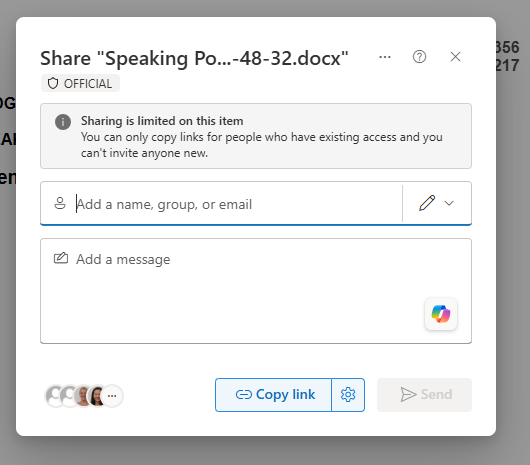
This is expected behaviour. Brief Connect manages access to record documents through the record's permissions, not through direct document sharing.
Why direct sharing is limited
Brief Connect stores record documents in SharePoint, but the record remains the source of truth for who can access those documents.
Direct sharing is limited to protect:
- Record permissions: users should only see documents for records they are allowed to access in Brief Connect.
- Workflow roles: approvers, reviewers, owners, and other record roles receive access through the workflow and role assignments.
- Access caveats: sensitive records may have additional restrictions that prevent wider access.
- Audit and governance: access changes should happen through Brief Connect so the record remains controlled and traceable.
- Microsoft 365 security controls: SharePoint, sensitivity labels, retention, and data loss prevention policies continue to apply to the document.
Because of this, the SharePoint sharing panel may let you copy a link, but only for people who already have access. It will not let you invite a new person directly from the document.
What you can do instead
If someone needs access to a Brief Connect document, give them access to the record rather than sharing the individual file.
Depending on your role and your organisation's process, you can:
- Add the person to the appropriate record role or workflow task.
- Update the record's access permissions if you are authorised to do so.
- Ask the record owner, record administrator, or Brief Connect administrator to grant access.
- Share a copied link only after the person already has access to the record.
- Use an approved PDF pack or snapshot if your process requires a point-in-time copy of the record documents.
What the message means
The message does not usually mean the document is broken. It means SharePoint is enforcing the access model applied by Brief Connect.
You can still open, edit, and collaborate on the document if your Brief Connect role gives you permission. You just cannot use the SharePoint sharing panel to add new people directly to that file.