Draft documentation
This solution design is a draft. Validate it against the approved tool package and customer operating procedures before use.
Election Readiness Tools Solution Design
Version history
| Version | Changes | Date | Author |
|---|---|---|---|
| 0.1 | Early draft | 17 Sept, 2026 | Maksim Murashka |
| 1 | Added details for 2 phase deletion process and Application offline/online timings in the flow process | 18 Sept, 2026 | Maksim Murashka |
Executive Summary
The Election Readiness tools are standalone operational tools that support Brief Connect customers during election, caretaker, disposal, transfer, and exceptional data-management activities. They are designed for authorised administrators who need point-in-time control over Brief Connect records and SharePoint metadata without adding new Brief Connect user-interface features, background jobs, schedulers, permanent application services.
Business Context
Some government customers must prepare cabinet material and other controlled records when a government changes or when a caretaker period begins. Records teams may need to classify, transfer, dispose of, or export material using their own electronic document and records management systems.
Those downstream records-management tools typically inspect documents in SharePoint, read document-level metadata, group and bundle documents by that metadata, apply retention or disposal controls, and build transmittal objects such as Victorian Electronic Objects. Brief Connect stores record metadata primarily on SharePoint Document Sets and in the Brief Connect database. Without an operational extension, child documents can appear to downstream tooling without the metadata needed to group and process them.
Customers may also need controlled deletion for legal disposal obligations, reclaiming SharePoint space after material has been archived elsewhere, or removing test data from non-production environments. Manual deletion in SharePoint is incomplete and difficult to evidence because it can miss related artefacts, leave content in recycle bins, leave Brief Connect pointing to missing content, or leave data in databases, storage, caches, reports, and generated packs.
Solution Goals and Objectives
The Election Readiness tools provide controlled operational capabilities while preserving the core Brief Connect architecture.
The solution goals are:
- Enable records teams to use existing records-management and EDRMS tooling against Brief Connect SharePoint libraries by exposing selected parent record metadata on child documents.
- Provide point-in-time assurance that selected SharePoint metadata matches authoritative Brief Connect database values.
- Provide deletion process for selected records and related confirmed Brief Connect-controlled artefacts.
- Produce durable local evidence of scope, operator identity, progress, outcomes, failures, logs and completion state.
- Run from customer-controlled infrastructure.
- Avoid distributing credentials, certificates, tokens, connection strings, or document contents to operators.
- Keep the tools independent from the Brief Connect UI, application APIs, queues, and service availability.
Scope
The solution covers the two operational tools and the shared runtime infrastructure.
| Area | In scope |
|---|---|
| Metadata propagation | Configuration-driven selection of record types and fields, Shared Fields configuration for existing SharePoint content types, metadata drift scans, confirmed correction of SharePoint values, and evidence generation. |
| Record deletion | Dry-run scope resolution, immutable job definition, explicit live confirmation, deletion of confirmed in-scope artefacts, Personal Storage clearing, cache flushing, durable progress, restart, and completion reporting. |
| Shared infrastructure | Azure VM, runtime requirements, managed identities, network access, operator access, local output storage, and customer security controls. |
Out of Scope
The tools deliberately do not become native Brief Connect product features.
The following items are out of scope:
- Brief Connect UI screens for the tools.
- Scheduled execution, always-on monitoring, or background service hosting.
- Delegated user sign-in, device-code sign-in, or per-user attribution of SharePoint and Microsoft Graph operations in platform audit logs.
- Approval workflows or second-person authorisation in the tools.
- Undo, restore, backup, export, or pre-deletion archive capabilities.
- Automated Brief Connect queue draining, application shutdown, or verification that Brief Connect is offline.
- Power BI imported dataset deletion, downloaded report file deletion, or purge of external reporting copies.
- Deletion or control of copies that have left Brief Connect-controlled systems, including emails, downloads, exports, forwarded files, webhook payloads, external archives, Microsoft-managed platform logs, and Microsoft platform recovery copies.
- Arbitrary query builders, interactive record pickers, or unrestricted SharePoint filters.
- SharePoint site-column creation, removal, type conversion, provisioning, or deprovisioning by the metadata propagation tool.
Compatibility
The same tool build should run across the agreed supported Brief Connect versions, with configuration selecting the appropriate data-access behaviour.
The target compatibility range is Brief Connect 2.5.10 through 2.6.3, with 2.7.0 included when released and validated.
The tools support two Brief Connect database models:
| Database model | Brief Connect versions | Data stores |
|---|---|---|
| Legacy DB | 2.5.10 only |
Data is distributed across Azure Storage Tables, Azure Storage Blob, and Azure Cosmos DB. |
| Latest DB | 2.5.10 and above |
Operational data is stored in Azure DocumentDB (MongoDB). Azure SQL is also accessed where required by the selected tool operation. |
Brief Connect 2.5.10 may use either model, depending on how the environment is configured. Later supported versions use the Latest DB model.
The tool documentation and deployment package describe both models so that the same artifact can operate against every supported Brief Connect version. However, only one database model can be active for a Brief Connect environment at a time. Each tool run must therefore select exactly one corresponding database configuration. The Legacy DB and Latest DB configurations are mutually exclusive: the tools must not connect to, combine data from, or fall back between both models during the same run. Preflight validation must reject a missing, ambiguous, or incompatible database-model configuration before any data is changed.
High-Level Architecture
The solution contains two operational tools that run from the same customer-controlled infrastructure model:
| Tool | Purpose |
|---|---|
| SharePoint metadata propagation and reconciliation tool | Makes selected Brief Connect record metadata available on child documents inside SharePoint Document Sets and reconciles metadata drift between SharePoint and the Brief Connect database. |
| Brief Connect record deletion tool | Performs dry-run-first, explicitly confirmed deletion of selected Brief Connect records and related artefacts across confirmed Brief Connect-controlled stores. |
Both tools are packaged and run as on-demand console tools. The tools are run by an authorised operator on a customer-controlled Azure VM. The VM is a privileged operational execution host. It is not part of the Brief Connect application runtime and is not a Brief Connect dependency.
The tools use the managed identities associated with VM to access the existing Brief Connect resources where Azure RBAC is configured, and connection strings or other credentials from Brief Connect Key Vault to access other Brief Connect resources and downstream APIs.
The tools access Brief Connect-controlled stores directly. They do not call the Brief Connect UI or application APIs, and they do not require the Brief Connect application service to be available.
flowchart LR
    subgraph Election Readiness Tools
        Tools[VM with Tools]
    end
    subgraph Brief Connect
        BC[Brief Connect App]
        DB[(Active Brief Connect Database Model)]
        Graph@{ shape: st-rect, label: "Microsoft Graph API"}
        SP@{ shape: st-rect, label: "SharePoint Online API"}
    end
    Operator@{ shape: circle, label: "Authorised operator"} --> Tools
    Tools --> DB
    Tools --> Graph
    Tools --> SP
Technical Architecture
Runtime and Component Model
The tools target net10.0 and are published as self-contained win-x64 console executables that run as local processes on the Election Readiness tools VM. The VM does not require a separately installed .NET runtime; the .NET 10 SDK is required only by development and build environments.
The tools share the same host, identity, connectivity, configuration-validation, retry, and evidence patterns, but each tool has its own inputs, processing rules, and state model. These are batch tools rather than web applications: they expose no inbound application endpoint and do not introduce an API, user interface, scheduler, queue consumer, or persistent service.
The logical responsibilities are:
| Component | Responsibility |
|---|---|
| Console entry point | Parses the command and input files, identifies the operator, displays scope and progress, and returns a non-zero exit code when failures remain. |
| Preflight validation | Validates the supported operating system and architecture, package completeness, input and configuration files, output storage, target endpoints, permissions, parameter consistency, and the selected database model before changes are permitted. It does not require a machine-wide .NET runtime. |
| Database-model adapter | Encapsulates either Legacy DB or Latest DB access. A run instantiates exactly one adapter and does not query or combine both models. |
| SharePoint integration | Uses Microsoft Graph where suitable and SharePoint APIs, including CSOM where required, for Document Set, content-type, Shared Fields, and deletion operations. The implementation selects the supported API for each operation. |
| Tool workflow | Implements either metadata propagation and reconciliation or dry-run-first record deletion. Shared infrastructure does not combine their job semantics. |
| Local state and evidence | Streams job definitions, journals, CSV reports, summaries, diagnostics, and detailed error information to the tools data disk without storing credentials or document contents. |
The tools integrate with the existing Brief Connect resources shown below. They bypass the Brief Connect SPA, Function App, API Web App, application queues, and normal metadata jobs.
flowchart LR
    Operator@{ shape: circle, label: "Authorised operator"}
    Output@{ shape: lin-cyl, label: "Local tools data disk" }
    Entra[Microsoft Entra ID]
    Graph[Microsoft Graph API]
    SPO[SharePoint Online API / CSOM]
    subgraph "Brief Connect"
        KV[Key Vault]
        Storage@{ shape: lin-cyl, label: "Azure Storage Tables & Blob"}
        Cosmos[("Azure Cosmos DB")]
        DocumentDB[("Azure DocumentDB")]
        SQL[(Azure SQL)]
        SharePoint@{ shape: docs, label: "SharePoint site"}
    end
    subgraph Tool["EC Tool console process"]
        Adapter{Configured database adapter}
    end
    Operator --> Tool
    Tool --> Output
    Entra -. app-only token .-> Tool
    Tool --> KV
    KV -. certificate and connection strings .-> Tool
    Adapter -->|Legacy DB| Storage
    Adapter -->|Legacy DB| Cosmos
    Adapter -->|Latest DB| DocumentDB
    Adapter -->|Latest DB| SQL
    Tool --> Entra
    Tool --> Graph & SPO --> SharePoint
The Legacy DB and Latest DB paths in the diagram are alternatives. The selected path must match the target Brief Connect environment and supported version. Brief Connect 2.5.10 can use either model; later supported versions use the Latest DB model.
Brief Connect Integration
Brief Connect remains authoritative for record structure and metadata. The tools reuse its environment-specific resources and security configuration but do not become part of its application runtime.
| Integration point | Metadata propagation and reconciliation | Record deletion |
|---|---|---|
| Existing Brief Connect Key Vault | Read the Server App certificate and active database connection values at runtime. | Read the Server App certificate and active database connection values at runtime. |
| Legacy DB: Azure Storage Tables and Blob | Read record, record-type, field, and schema information for configured scope. | Resolve scope and delete only confirmed record artefacts from validated locations. |
| Legacy DB: Azure Cosmos DB | Not required by the documented metadata workflow. | Delete confirmed record artefacts where the validated deletion inventory requires it. |
| Latest DB: Azure DocumentDB (MongoDB) | Read record, record-type, field, and schema information for configured scope. | Resolve scope and delete confirmed record artefacts from validated collections and GridFS storage. |
| Latest DB: Azure SQL | Not required by the documented metadata workflow. | Delete confirmed relational replicas using the existing Brief Connect SQL managed identity where applicable. |
| SharePoint Online | Configure Shared Fields on selected existing content types, inspect libraries and Document Sets, reconcile selected metadata, and verify propagation to child documents. | Delete confirmed Document Sets, their contents and versions without retaining them in either SharePoint recycle-bin stage; clear Personal Storage as a job-wide operation. |
| Microsoft Graph and SharePoint APIs | Discover and update in-scope SharePoint resources. | Discover and delete in-scope SharePoint resources. |
| Brief Connect caches | No direct dependency. | Flush confirmed distributed and application cache entries as a job-wide operation; the implementation must validate all applicable application instances. |
The Brief Connect data design represents each record as a SharePoint Document Set in a record-type library. Record metadata is held in the authoritative operational database and replicated to the Document Set. The metadata tool preserves that one-way relationship: it reads the database and writes only the selected SharePoint replica. It relies on Brief Connect to provision site columns and content types and does not create, remove, or change their types.
The deletion tool operates across distributed stores because deleting only the SharePoint Document Set would leave Brief Connect database, storage, reporting-replica, workflow, access, task, audit, and generated-pack artefacts. A location is included in live deletion only after its schema, correlation key, deletion behaviour, and verification method have been validated. External copies, Microsoft-managed logs and recovery copies, Power BI imported datasets, email, delivered webhooks, and user exports remain outside the architecture boundary.
Authentication and Data Access
The tools use non-interactive identities associated with the VM; an operator is not given service credentials.
- The VM system-assigned managed identity authenticates to the existing environment-specific Brief Connect Key Vault through Azure RBAC.
- The tool retrieves only the connection values for the configured database model and the existing Brief Connect Server App certificate required by that run.
- The tool uses the Server App certificate with the OAuth 2.0 client-credentials flow to obtain application tokens for Microsoft Graph and SharePoint. Its SharePoint access remains constrained by the existing Brief Connect application permissions and site grants.
- For Latest DB deletion operations that require Azure SQL, the tool uses the existing Brief Connect user-assigned SQL managed identity attached to the VM with Entra ID authentication.
- Certificates, private keys, tokens, connection strings, and secret values are held only for runtime use and are not written to command lines, configuration, logs, reports, or job state.
This differs from the normal Brief Connect interactive flow: there is no SPA sign-in, delegated user token, or on-behalf-of exchange. Microsoft 365 audit records therefore identify the Brief Connect Server App as the caller. The local tool evidence separately records the Entra identity of the VM operator and correlates it with job, attempt, scope, time, and outcome.
Metadata Propagation and Reconciliation Flow
The metadata tool uses the database as the source of truth and SharePoint Shared Fields as the native propagation mechanism.
sequenceDiagram
    actor O as Operator
    participant T as Metadata tool
    participant DB as BC Database
    participant SP as BC SharePoint Site
    participant E as Local evidence

    O->>T: Start with record-types and fields configuration
    T->>T: Run preflight
    T->>DB: Resolve record types, fields and authoritative values
    T->>SP: Resolve existing content types and site columns
    T->>SP: Configure selected columns as Shared Fields
    T->>SP: Propagate and verify content-type settings in libraries
    T->>SP: Read selected Document Set metadata
    T->>E: Write metadata drift report
    E-->>O: Review the report
    O->>T: Confirm reported correction scope
    T->>DB: Re-read current authoritative values
    T->>SP: Re-read current SharePoint values
    alt Values still match the confirmed finding
        T->>SP: Correct selected Document Set values
        SP->>SP: Propagate Shared Fields to child documents
        T->>SP: Verify child document properties
    else Values changed since scan
        T->>E: Record new finding without applying stale values
    end
    T->>E: Write outcomes, diagnostics and summary
The tool processes only configured record types and fields. Existing correct values are skipped. A repeat run recalculates drift from current database and SharePoint state; previous evidence may be used to avoid repeating completed work, but the tool does not use the deletion tool's immutable job-definition model.
Record Deletion Flow
Deletion is one operation with separate dry-run and live stages. The dry run is always non-destructive and freezes the resolved record IDs and job parameters. Live deletion cannot re-resolve a dynamic selection or add newly created records to the reviewed scope.
sequenceDiagram
    participant BC as Brief Connect App
    actor DevOps
    actor O as Operator
    participant T as EC Deletion Tool
    participant DB as BC Database
    participant SP as BC SharePoint Site
    participant E as Local job state

    DevOps->>BC: Shuts down the application
    Note over BC: Application offline
    DevOps-->>O: Reports the app is offline
    DevOps->>BC: Flush the application cache (in parallel while offline)
    O->>T: Start dry run with one selection mode
    T->>T: Run preflight
    T->>DB: Resolve and deduplicate Record IDs
    T->>DB: Discover validated related artefacts
    T->>SP: Discover Document Sets and related content
    T->>E: Write immutable job definition and review reports
    T->>E: Write mutable pre-calculated job scope
    E-->>O: Review job definition and scope
    O->>T: Confirms records in scope deletion
    T->>T: Repeat preflight and display target and scope
    T->>E: Retain SharePoint correlation data for every frozen record
    Note over T,DB: Phase 1: Brief Connect Database
    loop Each frozen record
        T->>DB: Delete confirmed database and storage artefacts
        T->>E: Persist database artefact and record outcomes
    end
    T-->>O: Report database phase outcomes
    O-->>DevOps: Report database phase completed
    DevOps->>BC: Starts the application
    Note over BC: Application online
    Note over T,SP: Phase 2: Brief Connect SharePoint Site
    loop Each frozen record
        T->>SP: Delete confirmed SharePoint artefacts
        T->>E: Persist SharePoint artefact and record outcomes
    end
    T->>SP: Empty all users' Personal Storage
    T->>E: Write final status and summary
Live deletion runs in two sequential, job-wide phases.
Phase 1 processes every frozen record's confirmed Brief Connect database and storage artefacts to a terminal outcome and reports the database phase outcomes to the operator.
Only then does Phase 2 begin deleting SharePoint artefacts. Sufficient SharePoint correlation data is retained before Phase 1 starts so that deleting database data cannot prevent Phase 2 from locating the corresponding Document Sets and related content.
The job definition, attempt journal, and phase-specific per-artefact outcomes are durable local state. On restart, completed records within the active phase are skipped, the interrupted record is retried from the beginning of that phase, and an already absent artefact counts as successfully deleted. A job is complete only when every confirmed record artefact is deleted or absent and required job-wide Personal Storage and cache operations succeed. No tool operation restores deleted content.
The customer must take Brief Connect offline, drain relevant queues, and establish a quiet period before live deletion. This prevents the application from updating or recreating data while stores are being modified. The tool neither performs nor verifies application shutdown or queue draining.
Processing, Failure, and Consistency Model
Both tools are designed for multi-hour workloads in large tenants. At deployment, the largest target tenants may contain more than one million documents across tens of thousands of records. The tools continue processing unrelated units after an item-level failure and use bounded concurrency, batching where safe, and service-specific bounded retries. Microsoft Graph and SharePoint responses that include Retry-After are honoured because the tools share the Brief Connect Server App's per-application throttling budget with the running application.
Service updates may be eventually consistent. The metadata tool verifies Shared Fields configuration and document-level propagation rather than assuming an accepted request is complete. The deletion tool records deletion and verification outcomes per artefact; retries must not turn an absent artefact into a failure. Permanent or exhausted failures remain visible in the final status and cause a non-zero process exit.
Deletion jobs persist progress so they can resume safely after interruption. Metadata propagation runs use repeat execution and recalculated scope rather than deletion-style immutable job state.
Output is streamed or periodically flushed so process failure or VM session termination does not discard the complete run history. Main artefacts are sanitised; identifying filenames, paths, or URLs needed for remediation are isolated in a more restricted detailed error file. Large-scope evidence must be bounded. Production runs must account for CSV size, detailed error-file growth, local disk free space, checkpoint frequency, memory use, and report sharding or streaming where required. These limits must be validated against the largest supported tenant before production use.
Deployment Architecture
Azure Infrastructure Diagram
The following diagram describes Azure components and how they are integrated with Brief Connect.
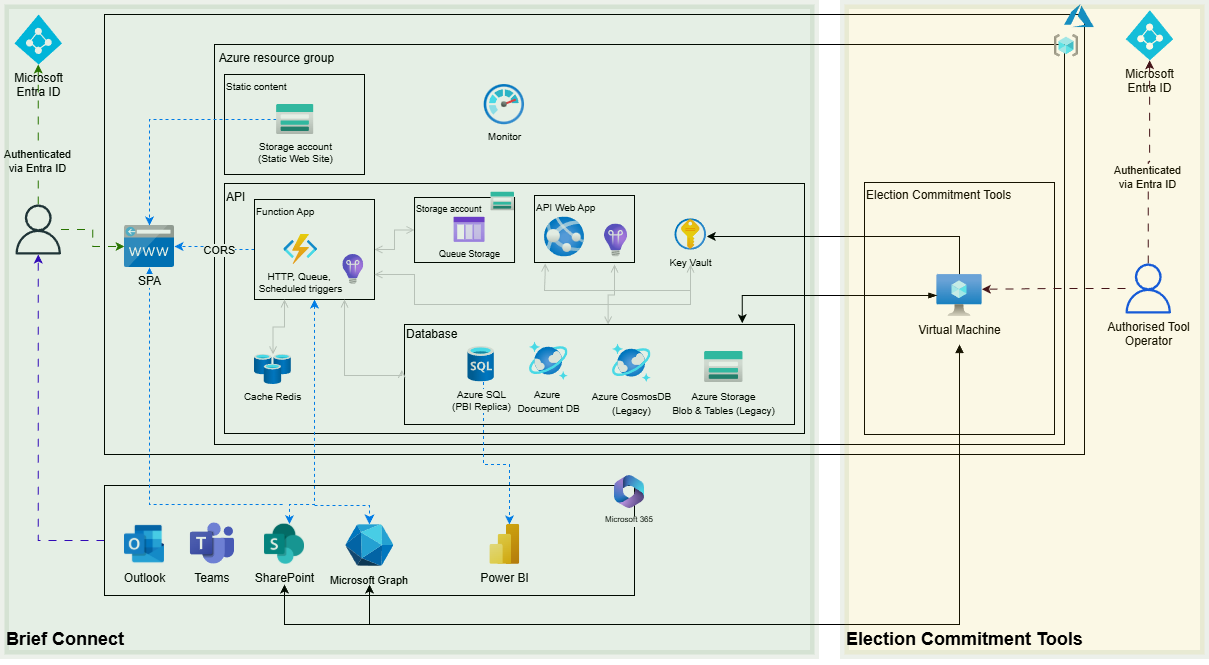
The diagram includes components for both supported database models to document the complete deployment options. For any individual Brief Connect environment, only the components and connections for its active Legacy DB or Latest DB model apply.
Azure Resources
Each Brief Connect environment has its own dedicated, customer-controlled Election Readiness tools environment. The same Azure resource SKUs and configuration are used for production and non-production Election Readiness tools environments; there is no environment-specific sizing or configuration difference in this design. Each tools environment is secured according to the sensitivity of the Brief Connect environment and data it can access.
The Azure Pricing Calculator export models the following billable resources in Australia Southeast:
| Resource | Configuration | Purpose |
|---|---|---|
| Azure Virtual Machine | One B2ls v2 instance with 2 vCPU and 4 GB RAM, Windows licence included, pay-as-you-go, modelled for 730 hours per month |
Provides the runtime environment for the packaged Election Readiness tools and the managed identity and network context used to access Brief Connect resources. |
| OS Managed Disk | One E10 128 GiB Standard SSD with locally redundant storage and 1,000 transaction units |
Hosts the Windows operating system and installed dependencies if required. |
| Tools Data Managed Disk | One E6 64 GiB Standard SSD with locally redundant storage and 1,000 storage transactions |
Stores Election Readiness tool packages and tools-only data, including configuration, job definitions, journals, logs, reports, and error files. It is not used as the VM operating system disk. |
The VM is intentionally a single-instance operational runner. Availability zones, load balancing, autoscaling, and a second VM are not required because the tools are manually invoked and their durable output supports restart or repeat execution.
The B2ls v2 configuration is the initial sizing baseline. CPU, memory, tools data-disk capacity, and free-space requirements must be validated using representative multi-hour jobs and the largest expected customer scope before a production operation. A larger VM or tools data disk may be required where testing demonstrates that the baseline is insufficient.
The estimate does not add separate costs for existing Brief Connect resources used by the tools. These include Key Vault; Azure Storage and Azure Cosmos DB for the Legacy DB model; or Azure DocumentDB and Azure SQL for the Latest DB model. Only the resources for the environment's active database model are used. Their existing service charges, request consumption, data storage, and licensing remain part of the customer's Brief Connect environment.
Costs
The following per-environment estimate is based on the Azure Pricing Calculator CSV export created on 16 September 2026. Prices are in Australian dollars under the Microsoft Customer Agreement licensing program. The calculator assumes the VM runs for 730 hours each month.
| Service | Pricing assumption | Estimated monthly cost | Estimated upfront cost |
|---|---|---|---|
| Azure Virtual Machine and OS disk | One Windows B2ls v2 with one 128 GiB Standard SSD LRS E10 OS disk and 1,000*10,000 transaction units, pay-as-you-go, 730 hours per month |
$85.19 | $0.00 |
| Tools Data Managed Disk | One 64 GiB Standard SSD LRS E6 data disk and 1,000*10,000 transaction units |
$11.86 | $0.00 |
| Total from calculator export | $97.05 | $0.00 |
This is a planning estimate rather than a quote. Actual charges depend on current Azure pricing, the customer's agreement, taxes, disk transactions, backup and monitoring configuration, network architecture, and operating schedule. Compute charges can be reduced by deallocating the VM when the tools are not in use; managed disk and any other retained-resource charges continue while the VM is deallocated.
The exported estimate assumes zero inter-region outbound data transfer and does not include disks beyond the E10 OS disk and E6 tools data disk, Azure Bastion, public IP addresses, backup, Defender for Cloud, Log Analytics ingestion, or other customer-mandated operational services. It also excludes additional networking costs where the Brief Connect environment's network configuration requires corresponding connectivity for the Election Readiness tools environment. These costs may include additional network interfaces, private endpoints, virtual network peering, VPN or ExpressRoute connectivity, firewalls, NAT Gateway, private DNS zones, routing components, and associated data processing or transfer charges. These items must be added to the estimate based on the target environment's network architecture.
Security Architecture
The VM is a privileged operational host because code running on it can use its managed identities to access Brief Connect data. Access to the VM, its identities, the tool packages, configuration, and retained output must therefore be restricted to authorised tool operators and administrators.
Network Security
The VM does not host a public application endpoint. Its inbound network access is limited to customer-approved administration paths:
- RDP access is restricted to authorised operators only. An Entra ID security group is the recommended mechanism for controlling operator access, together with customer-approved controls such as Conditional Access, multi-factor authentication, privileged access management, just-in-time access, Azure Bastion, VPN, or an equivalent secured administration path.
- Network Security Groups and firewalls permit only the required inbound administration traffic and required outbound service traffic.
- The VM uses the customer's approved outbound internet or proxy path for Microsoft 365 endpoints. All service communication uses HTTPS with TLS 1.2 or higher.
The VM requires outbound connectivity to the shared integration points and to the integration points for the environment's active database model:
| Integration point | Network and security requirement |
|---|---|
| Azure Key Vault | Allow the VM to retrieve the existing Brief Connect Server App certificate and required connection-string secrets using its system-assigned managed identity. |
| Azure SQL (Latest DB, where applicable) | Allow the VM to reach the applicable SQL endpoint. Authentication uses the existing Brief Connect user-assigned SQL managed identity with Microsoft Entra ID authentication. |
| Azure Storage Tables and Blob (Legacy DB) | Allow access to the applicable data endpoints. Authentication uses connection strings retrieved from Key Vault. |
| Azure Cosmos DB (Legacy DB) | Allow access where required by the record deletion tool. Authentication uses connection values retrieved from Key Vault. |
| Azure DocumentDB (MongoDB) (Latest DB) | Allow access to the applicable operational database endpoint. Authentication uses connection strings retrieved from Key Vault. |
| Microsoft Graph and SharePoint Online | Allow outbound HTTPS to the required Microsoft 365 endpoints. The tools authenticate in application context by using the existing Brief Connect Server App registration and certificate. |
Where a target service is protected by Private Link, private endpoints, service firewalls, VNet integration, custom DNS, or forced tunnelling, the VM subnet, routes, firewall rules, and DNS configuration must provide the corresponding private path. Private Link environments must provide working private DNS resolution from the VM for every required private endpoint. Public access or permissive firewall rules must not be enabled solely to accommodate the tools where an approved private path exists.
Identity and Access Control
The tools use identities associated with the VM rather than credentials assigned to operators:
| Identity | Authentication and authorisation | Use |
|---|---|---|
| VM system-assigned managed identity | Azure Managed Identity with Azure RBAC; assigned Key Vault Secrets User on the environment-specific Brief Connect Key Vault |
Retrieves the Brief Connect Server App certificate and the connection strings required by the active Legacy DB or Latest DB model at runtime. It is not used as the SQL execution identity. |
| Existing Brief Connect user-assigned SQL managed identity | Microsoft Entra ID authentication with database permissions scoped to the operations required by the tool | Connects to Azure SQL for the Latest DB model where applicable. The identity is attached to the VM and selected explicitly for SQL token acquisition. It is not required for the Legacy DB model. |
| Authorised VM operator | Organisational Entra ID account and membership of the customer-managed operator group | Signs in to the VM and starts an approved tool run. |
| Brief Connect Server App | Microsoft Entra application identity using OAuth 2.0 client credentials with a certificate | Obtains app-only access tokens for Microsoft Graph and SharePoint Online by using the application's existing permissions. |
Azure role assignments and database permissions must be scoped to the target Brief Connect environment and follow least privilege. Access to the VM and role assignments must be reviewed and removed when no longer required.
Key Vault and Downstream API Authentication
The tools use the existing environment-specific Brief Connect Key Vault and secret-handling pattern rather than introducing a separate credential store. At start-up, the VM system-assigned managed identity authenticates to Key Vault through Microsoft Entra ID and Azure RBAC. The tools retrieve only the secrets required for the selected run:
- Legacy DB connection strings for Azure Storage Tables, Azure Storage Blob, and Azure Cosmos DB; or the Latest DB connection string for Azure DocumentDB (MongoDB). Only secrets for the configured active database model are retrieved.
- The existing Brief Connect Server App certificate, including its private key, for Microsoft Graph and SharePoint Online authentication.
The certificate is used in the same way as the original Brief Connect application: the tool uses the existing Server App registration, tenant and client identifiers, and client-certificate credentials flow to request app-only access tokens for Microsoft Graph and SharePoint. No new app registration, client secret, delegated user flow, or device-code sign-in is introduced. The certificate and tokens are held only in memory for the required operation and must not be written to local output.
Key Vault values are retrieved at runtime and are not copied into source code, tool packages, operator configuration, command-line arguments, or retained job artefacts. Operators are not granted direct access to certificates, private keys, database credentials, connection strings, or access tokens. Certificate and secret rotation remains part of the existing Brief Connect operational process; subsequent tool runs retrieve the current Key Vault values.
Host, Data, and Audit Security
The customer applies its approved VM patching, endpoint protection, secure boot and vTPM settings, disk encryption, monitoring, backup, and access-review controls. The tools data disk and output folders must be accessible only to authorised operators and administrators and retained according to customer governance and disposal requirements.
No retained tool artefact may contain access tokens, certificate values, private keys, Key Vault secret values, connection strings, or document contents. Detailed error files may contain filenames, paths, or URLs required for remediation; they are stored separately so administrators can apply stricter access and retention controls.
SharePoint and Microsoft Graph platform audit logs attribute tool operations to the Brief Connect Server App because the tools run in application context. The tools' retained evidence records the Entra identity of the VM operator who initiated the run, along with the job and attempt identifiers, timestamps, scope, and outcome. Together, these records provide application-level and operator-level traceability.
Logging, Audit, and Evidence
Each run writes local output to a job-specific folder. The output location must be writable before the tools change customer data.
Common evidence includes:
- Tool name and version.
- Job ID and attempt ID.
- VM operator identity.
- Execution timestamps and elapsed time.
- Target environment and service endpoint identifiers.
- Input configuration or frozen scope reference.
- Records, fields, libraries, content types, or artefacts processed.
- Success, skipped, failed, incomplete, stopped, or interrupted outcomes.
- Retry attempts and downstream correlation information where available.
- Summary counts and final status.
Main retained artefacts should avoid filenames, SharePoint paths, URLs, titles, descriptive record fields, tokens, secrets, connection strings, and document contents. Detailed logs and audit files may include identifying information required for remediation and should be retained or deleted by administrators according to customer policy.
Deployment and Operating Model
The Election Readiness tools are delivered as standalone console tools. They run manually on demand from the customer-controlled VM.
The expected operating model is:
- Customer prepares and secures the VM, identities, network paths, and output storage.
- Operator receives the packaged tool and copies it and run configuration to the VM through customer-approved channels.
- Tool preflight validates runtime environment, configuration, input files, output paths, downstream access, parameter consistency, and that exactly one compatible Legacy DB or Latest DB configuration is selected.
- Metadata propagation runs generate reports and apply confirmed SharePoint corrections.
- Deletion runs perform dry run first, freeze the deletion scope, require explicit count-based confirmation, and then process confirmed in-scope artefacts.
- Administrators retain or dispose of local evidence according to customer policy.
For live deletion, the customer is expected to take Brief Connect offline and drain relevant work queues before the deletion run so the application cannot conflict with or recreate deleted data. Queue draining, application shutdown, and confirmation of a quiet period are customer operating responsibilities. The deletion tool does not enforce these conditions.
Glossary
| Term | Definition |
|---|---|
| Brief Connect | Microsoft 365 and Azure-based briefing and correspondence management solution. |
| CSOM | SharePoint Client-Side Object Model. Used where required SharePoint functionality is not available through Microsoft Graph. |
| Document Set | SharePoint container used by Brief Connect to represent a record and hold its documents and metadata. |
| EDRMS | Electronic Document and Records Management System. |
| Entra ID | Microsoft Entra ID, formerly Azure Active Directory. |
| Graph | Microsoft Graph API. |
| Key Vault | Azure Key Vault, used to store certificates, secrets, and connection values. |
| Latest DB | Brief Connect database model supported by version 2.5.10 and above. Operational data is stored in Azure DocumentDB (MongoDB), with Azure SQL also accessed where required by the selected tool operation. |
| Legacy DB | Brief Connect database model supported only by version 2.5.10. Data is distributed across Azure Storage Tables, Azure Storage Blob, and Azure Cosmos DB |
| RBAC | Role-Based Access Control. |
| Shared Fields | SharePoint Document Set feature that synchronises selected parent metadata fields to child documents. |
| VEO | Victorian Electronic Object, a transmittal object used in Victorian records-management processes. |
| VM | Azure Virtual Machine used as the customer-controlled operational runner for the tools. |